

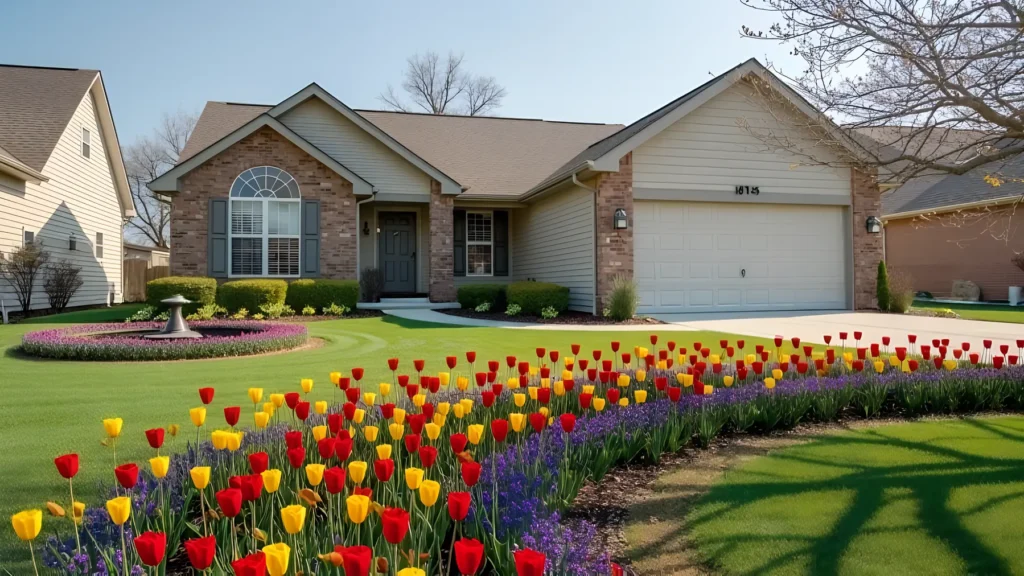
Ogrovision is an innovative ai landscape design tool that revolutionizes how homeowners and garden enthusiasts approach landscape design. Instead of struggling with sketches or expensive consultations, Ogrovision uses artificial intelligence to transform a photo of your yard into a beautiful, personalized garden visualization. With just a few clicks, you can explore new garden styles, sustainable layouts, and creative landscaping ideas — tailored exactly to your space.
By combining advanced image generation with intuitive text prompts, Ogrovision empowers users to experiment with raised beds, flower zones, lawn configurations, and much more. Whether you’re starting from scratch or upgrading an existing yard, Ogrovision helps bring your garden vision to life. Explore our garden design ideas for styles and inspiration, or see AI backyard design for outdoor living spaces.
How Does AI Garden Design with Ogrovision Work?
Ogrovision works by analyzing the image you upload of your current outdoor space and applying your design prompts to generate a realistic garden transformation. It’s as easy as uploading a photo and describing your dream garden — a modern raised bed with lavender, natural landscaping with wildflowers, or a lush lawn with a stone path and flower borders.
The AI understands your preferences and renders beautiful, customized garden concepts using cutting-edge image generation. Each version helps you visualize how your yard could look, giving you inspiration and direction without needing design experience.
Why Use Ogrovision for AI Landscape Design?
With Ogrovision, garden design becomes faster, more creative, and accessible for everyone. Key benefits include:
- Visual Inspiration: See how different designs would look in your actual yard.
- Customization: Tailor every detail to your preferences — plants, style, materials.
- Ease of Use: No design skills required. Just upload a photo and describe what you want.
- Sustainability: Test eco-friendly layouts like drought-resistant gardens or native plant beds.
- Cost Savings: Skip expensive design consultations and explore ideas for free or with affordable upgrades.
Can Ogrovision Create Personalized Garden Layouts?
Absolutely. One of Ogrovision’s strengths is its ability to generate unique, personalized layouts. Whether you want a low-maintenance minimalist garden or a romantic cottage-style retreat, the platform adapts to your prompts and the photo of your actual space. The result is a visual roadmap tailored to your tastes and real-world conditions.
The AI even considers elements like raised beds, mulch areas, or lawn segments — so the layout isn’t just pretty, but also practical.
How to Use Ogrovision to Design Your Garden
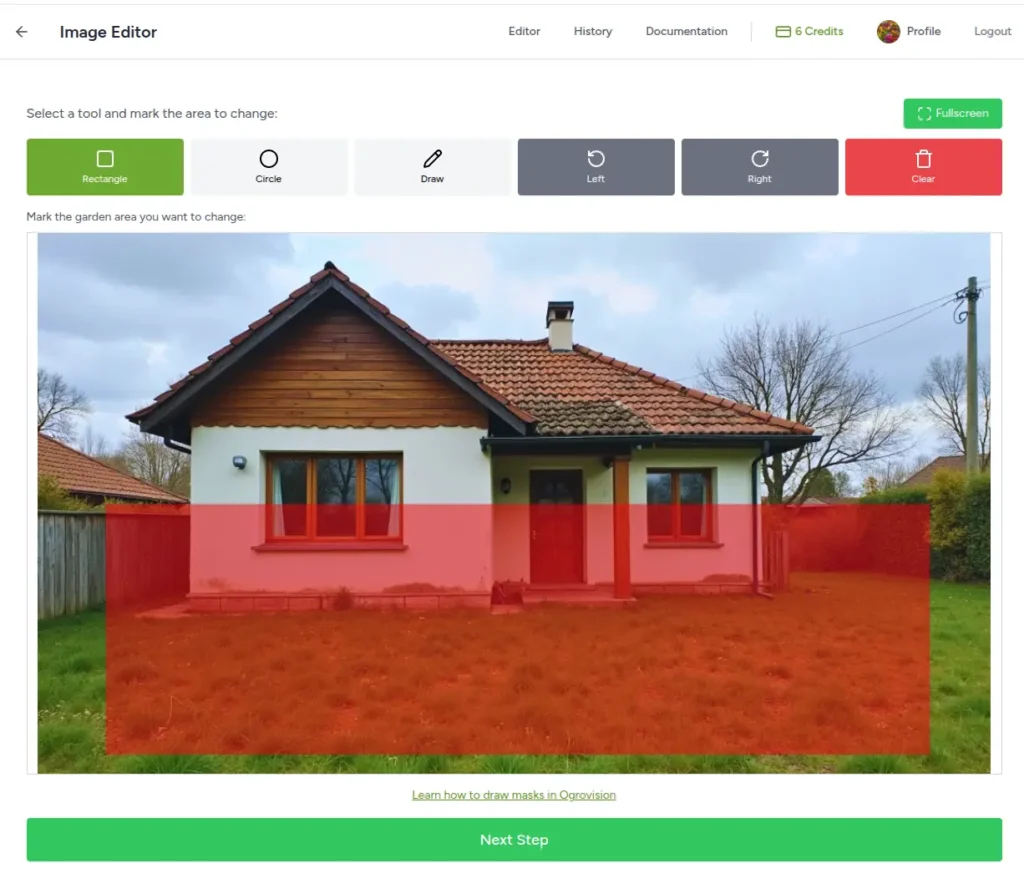
Using Ogrovision is simple:
- Upload a Photo: Snap a picture of your backyard, side yard, or any outdoor space you want to redesign.
- Describe Your Vision: In the prompt field, describe your ideal garden. Be specific or experimental — it’s up to you.
- Generate Designs: The AI will quickly produce a visual design overlay, showing how your space could look.
- Refine and Explore: Like what you see? Save it. Want to try a different style? Generate again with a new prompt.
You can try 2-3 designs for free — then optionally upgrade for more generations and premium features.
What Makes a Great AI Garden Design Tool?
A strong AI garden tool like Ogrovision should offer:
- Real-image based design: Not generic templates — real transformations of your actual space.
- Prompt customization: Users should be able to describe their dream space in their own words.
- Ease of use: No steep learning curve. Ogrovision is built for everyone, not just landscape pros.
- Visual accuracy: The generated image should look realistic and inspire action.
- Eco-conscious options: Suggestions for sustainable practices, like native planting or water-saving designs.
Ogrovision checks all these boxes — and more.
How to Upload a Photo for AI Garden Analysis
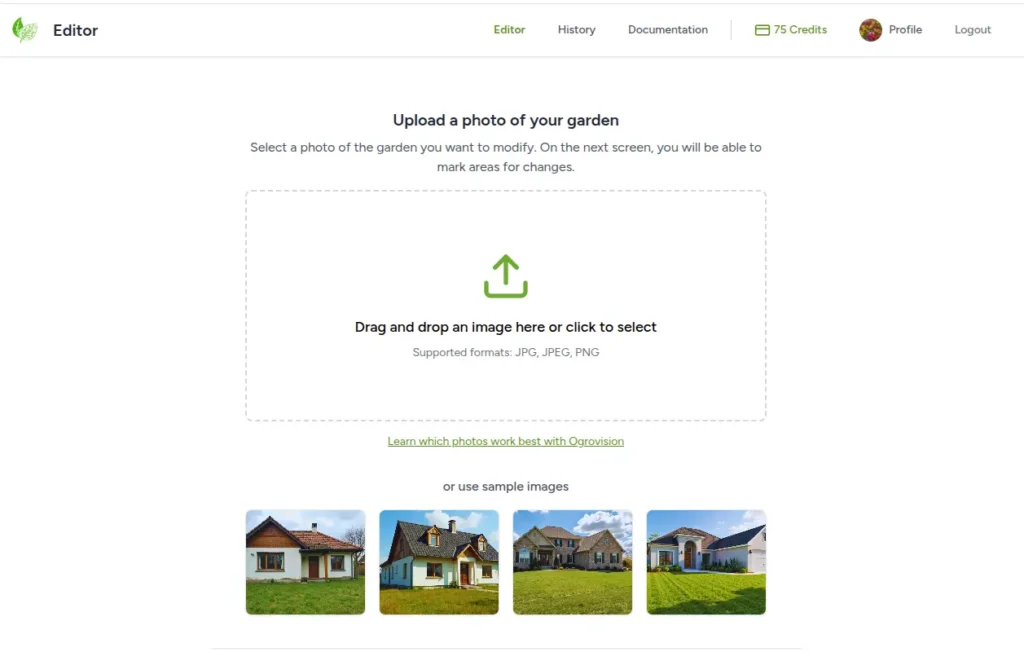
Uploading a photo to Ogrovision is easy:
- Visit app.aigarden.design.
- Create an account (it’s quick and free).
- Upload a clear image of your yard or space.
- Add a description of your dream garden in the prompt field.
- Generate and view your garden transformation.
Try different prompts to compare results and choose your favorite style.
Can I Generate Free AI Garden Design Ideas?
Yes! Ogrovision allows you to generate a few AI garden visualizations for free. This is perfect for testing out different styles before committing to a full landscaping project. Whether you’re just brainstorming or ready to renovate, the free plan offers a risk-free way to visualize your ideas.
Choosing Ogrovision Over Other Tools
While many general-purpose AI tools like ChatGPT, DALL·E, or SketchUp offer elements of design support, none are specialized for realistic garden visualization like Ogrovision. Comparing dedicated tools? See our overview of AI landscape design software. Here’s why Ogrovision stands out:
- Designed specifically for yards and gardens.
- Instant visual feedback from real yard photos.
- Polish-developed, easy to use, and tailored to both local and global audiences.
- Offers practical inspiration you can implement the same day.
Ready to See Your Future Garden?
Try Ogrovision for free and experience how AI can turn your photo into a beautiful AI landscape design. Whether you’re planting for beauty, function, or sustainability, Ogrovision helps you bring your outdoor vision to life.
👉 Start Designing Your Garden Now
Frequently asked questions
AI landscape design uses artificial intelligence to redesign your yard or garden directly on a photo of it. You upload a picture, describe the changes or pick a style, and the AI produces a realistic visualization in seconds — no drawing, modeling or design experience required.
Yes. Ogrovision gives you free credits to try AI landscape design with no credit card and no subscription. Generate your first designs for free, then add credits only if you want more.
Upload a clear, wide photo of your outdoor space, describe your vision (for example modern raised beds with lavender, or a lawn with a stone path), and the AI renders the change on your actual yard, matched to its perspective and lighting. You can refine the result with follow-up prompts.
AI is best for fast inspiration and visualizing options before you commit — it shows realistic concepts in seconds and at a fraction of the cost. For technical documentation, grading and large builds, a professional designer or CAD software is still the right tool; many people use AI first, then a pro to execute.
It depends on your goal. Homeowners who want quick, photo-based results favor tools like Ogrovision; professionals who need plans and 3D models use CAD suites such as Vectorworks or AutoCAD with Land F/X. See our full comparison of landscape design software for details.